

All Things WTU Leave: Leave Benefits, Using Banks & More
Using the Leave Banks
Process to use the Banks: Note there is no separate application to use the Banks
- Members should review the DCPS Leave of Absence Website and apply using the DCPS process that is outlined therein. https://dcps.dc.gov/page/dcps-leave-absence
- Be sure to indicate which bank(s) you wish to use when it comes time to select where your leave/pay is coming from
- Can also submit an application with the Americans with Disability Act (ADA) by the Labor Management & Employee Relations (LMER) team.
- DCPS will make determinations for FMLA and/or ADA eligibility and provide guidance on the leave that can be used through a preliminary approval award letter.
- The FMLA award letter will be automatically sent to the WTU Leave Bank Review Committee by DCPS.
- The committee will meet 2x per month (~1st and 3rd week). The Committee is made up of 3 WTU members (appointed by the WTU President) and two DCPS members (appointed by the DCPS Chancellor) who will approve Leave Bank usage.
- Those using the ADA Process must forward their ADA Approval to [email protected] so we can process it.
- We suggest that WTU Members forward their LOA Award letter to [email protected] just in case. While not a necessary step, this will allow the WTU to make sure everything is in order prior to our meetings.
- WTU and DCPS will share final decision making around eligibility to use either Bank per guidelines that will be updated and published from the latest negotiated policy as approved by the WTU Representative Assembly below (Or linked here):
Current WTU Leave Bank Policy
After the Leave Bank Review Committee meets:
| WTU | DCPS |
|
Will send an email message to members to the email address we have on file as to what was approved per the policy through email along with next steps. If you do not hear from the WTU within 3 weeks of receiving your DCPS LOA Award letter, reach out to leavebanks [at] wtulocal6.net |
Will communicate to the Payroll Technicians the approvals and for how much to be uploaded to a member's PeopleSoft account through PeopleSoft. The Payroll Technicians will work with those managing Building level Payroll to apply the leave to members and get them paid. |
Frequently Asked Questions about using the Leave Banks
-
Who do I contact directly at DCPS/WTU when I have Leave Bank concerns?
- DCPS is the Leave of Absence office: [email protected].
- WTU is the Leave Bank email: [email protected].
-
Do I need to fill out a separate form to use the WTU Leave Banks?
- No. The WTU Leave Banks are done purely through the DCPS LOA or ADA Process
- Just forward your final Award Letter from DCPS to [email protected] so that we can double check it to ensure that it was processed correctly.
- No. The WTU Leave Banks are done purely through the DCPS LOA or ADA Process
-
How long will it take to get my leave added?
- It depends. The WTU meets every 2 weeks with DCPS to process the latest applications.
- If you have not needed to use the leave yet, it will typically take 1-2 pay periods to get it loaded (depending on the timing of your submission).
- If you have already gone into Leave Without Pay status, it may take 2-4 pay periods to get the retroactive leave applied.
- It depends. The WTU meets every 2 weeks with DCPS to process the latest applications.
SY25-26 Policy and Management
| Action | WTU Sick Leave Bank Hours | WTU Parental Leave Bank Hours |
| SY25-26 Beginning Balance | 0 | 0 |
| SY25-26 Hours Donated | 18,431.75 | 7,916.00 |
| Hours Approved for Usage 10/16/25 | -1,905.00 | -5,091.00 |
| Hours Approved for Usage 11/6/25 | -2,710.00 | -669 |
| Hours Approved for Usage 11/14/25 | -706 | -1,683.00 |
| Hours Approved for Usage 12/2/25 | -2,104.00 | -240 |
| Hours Approved for Usage 12/11/25 | -1,668.00 | 0 |
| Unused hours returned as of 1/8/26 | 399 | 351 |
| Hours donated in Dec-Jan window | 1,682.00 | 2,437.00 |
| Hours Approved for Usage 1/22/26 | -2,375.00 | -2,261.00 |
| Hours Approved for Usage 2/5/26 | -1,615.00 | -253 |
| Unused hours returned as of 2/19/26 | 618 | 36 |
| Hours Approved for Usage 2/19/26 | -474 | -160 |
| Hours Approved for Usage 3/5/26 | -468 | -264 |
| Hours Approved for Usage 3/19/26 | -724 | 0 |
| Unused hours returned as of 4/6/26 | 802 | 160 |
| Hours Approved for Usage 4/7/26 | -1026 | 0 |
| Hours Approved for Usage 4/17/26 | -1143 | -340 |
| Unused hours returned as of 4/21/26 | 0 | 80 |
| Unused hours returned as of 4/30/26 | 0 | 80 |
| Hours Approved for Usage 4/30/26 | -282 | -80 |
| Hours Approved for Usage 5/14/26 | -858 | 0 |
| Hours Approved for Usage 5/27/26 | -411 | -64 |
| Unused hours returned as of 5/29/26 | 404 | 171 |
| Hours Approved for Usage 6/11/26 | -120 | 0 |
| Retro Approval for SY24-25 disputed time period | -1853 | 0 |
| Roll Over Balance for SY26-27 | 1,894.75 | 126 |
Joining/Donating to Leave Banks for SY26-27 has closed
The ONLY Enrollment Period: August 10th, 2026 - September 11th, 2026
You must be a WTU Member to join
Not sure if you're a member? Use this process to check
Tried to process your Leave Bank Enrollment and it wasn't working right? Fill out this form and contact [email protected]
Form: https://bit.ly/wtulbesupport
Currently out of leave? SY26-27 Leave will be loaded by August 31st and then you can join!
How to Join and/or Donate extra hours to the Leave Banks on PeopleSoft for SY26-27
Note for those in either Leave Bank SY25-26: You will automatically re-enroll for whichever bank you are a part of at the minimum 8 hour participation rate on September 11th, 2026.
- IF you believe you will be out of hours before September 11th, 2026 you must follow the steps to re-enroll in the bank before you run out of hours.
- If you wish to not re-enroll in either Leave Bank you can follow the steps below the join directions.
- If you are unsure if you are in the Leave Bank for SY25-26 you can follow the termination steps to see which banks show up in your drop-down menu
- If you are already enrolled in the SY25-26 leave banks and choose to follow the join process below, any hours that you put in will be in addition to the automatic re-enrollment 8 hours.
- Log into PeopleSoft.
- Click on the NavBar icon
 in the top right corner of the landing page.
 - Navigate to Self Service > Leave Transfer Requests > Donate Leave Request.
- Select “WTU Sick Bank” or “WTU Parental Bank” from the “Program Name” dropdown menu.
- Select “Donate from Sick” from the “From Entitlement” dropdown menu.
-
Enter Hours to Donate (must be at least 8 hours to enroll).
- Note: the donated hours will be removed from your sick leave balance the following day.
- Click on the Submit button at the bottom of the page.
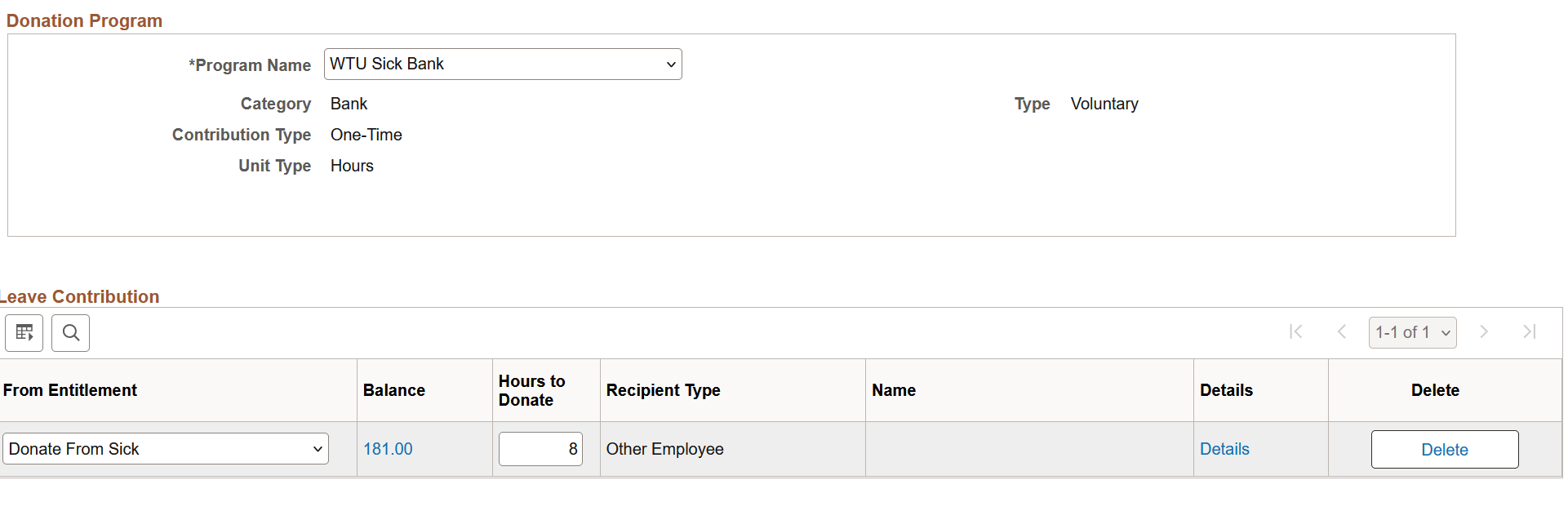
- There will be two confirmation screens after the submittal.
- Donation to another leave bank can be submitted similarly after the confirmation screens.
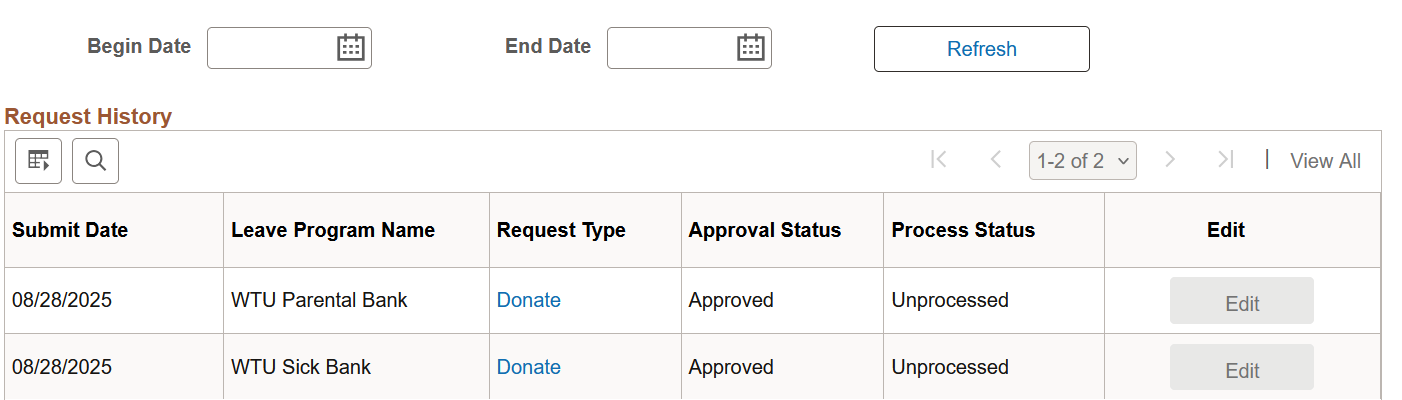
- A history of all leave bank donations can be viewed by going to Self Service > Leave Transfer Requests > Leave Transfer Request History.
How to terminate automatic re-enrollment and/or check if you will automatically enroll in the Leave Banks for SY25-26
Before You Begin
- You must submit a termination request for each Leave Bank program you are currently enrolled in that you wish to withdraw from before the enrollment period closes on September 11th, 2026.
Instructions
- Step 1: Navigate to the Termination page on PeopleSoft
- Go to: Self Service > Leave Transfer Requests > End Leave Transfer Request
- Step 2: Select the Leave Bank Program
- 1. Open the Program Name dropdown menu.
- 2. Select the DCPS Bank you want to terminate.
- Only the leave banks you’re currently enrolled in will appear.
- If nothing appears, you are not currently enrolled in a leave bank.
- If you are enrolled in more than one bank, each requires its own termination submission.
- Only the leave banks you’re currently enrolled in will appear.
- Step 3: Submit the Termination Request
- 1. Click Submit.
- 2. Confirm your choice by clicking Yes on the Submit Confirmation screen.
- 3. Click OK on the final confirmation screen.
- Step 4: Repeat if Necessary
- If you participate in multiple leave banks, repeat Steps 1–3 for each enrollment.
Check the Status of Your Termination Request
- To verify that your termination request has been processed, navigate to:
- Self Service > Leave Transfer Requests > Leave Transfer Request History
If you change your mind and decide to enroll after submitting the Termination Request, follow the regular enrollment steps to re-join the bank.
Frequently Asked Enrollment Questions
- When is the enrollment period? SY26-27 Enrollment will be open from August 10 through September 11, 2026.
- If I enrolled in the banks SY25-26 will I automatically re-enroll? Yes. You will automatically re-enroll on September 11th 2026.
- What if I don't want to re-enroll for SY26-27? You can follow the termination procedures (listed above) to terminate the re-enrollment process.
- What if I will run out of sick leave hours before September 11th? Then you must manually join the leave banks before you run out of hours.
- How many hours do I have to donate to be a part of the bank? You must donate a minimum of eight (8) hours per bank you wish to enroll in. In the PeopleSoft system members can now give more hours if they are interested and able.
- When will the donated hours be removed from the system? They will be removed by the next day after being processed
- If I submit to donate leave and change my mind during the open enrollment period can I get the hours back? No. Once you submit your donation through PeopleSoft that will be final until the next open enrollment period.

Learn More about Leave
Link if the information below doesn't load
WTU Sick Leave Load
All members of the WTU in ET 15 positions are advanced Sick Leave hours at the beginning of each school year. Note that Sick Leave hours will be pro-rated for all employees hired after the start of the school year. Sick Leave hours are advanced as follows:
- ET 15 (10-month):96 hours (12 days)
- ET 15 (11-month): 108 hours (13.5 days)
- ET 15 (12-month): 120 hours (15 days)
- EG 09 (12 month): 120 hours (15 days)
Up to 32 hours (4 days) per school year of the Sick Leave that you are advanced can be used as personal leave. Unused Sick Leave shall be carried forward from year to year. Sick Leave is not transferable and has no cash value; therefore, you will not receive the cash value of any remaining Sick Leave upon separation from employment.
WTU General and Annual Leave Accruals All members of the WTU in EG 09 positions earn General and Annual Leave, based on years of service. Employees with:
▪ 0-2 years of service earn four hours per pay period
▪ 3-15 years of service earn six hours per pay period
▪ 16+ years of service earn eight hours per pay period
Note: Members of the WTU in ET 15 positions are not eligible for General and Annual Leave.